


Best Manufacturing Execution Software of 2026
Updated March 24, 2026 at 2:04 PM

Written by Sabrina Khoulalène
Content Analyst

Reviewed by Cameron Pugh
Senior Advisor

Edited by Parul Sharma
Editor

Talk with us for a free 15-min consultation
Expert advisors like Jacqueline, who have helped 1,000+ companies, can find the right software for your needs.
- All Software
- Top Software
- Popular Comparisons
- Buyer's Guide
- Frequently Asked Questions
Manufacturing execution software helps businesses monitor and control production, optimizing processes and ensuring quality. With 300+ products on Software Advice, selecting the right one takes time. To help you narrow it down, I worked with our manufacturing execution software advisors to curate a list of recommended productsi and a list of highly-rated manufacturing execution software based on user reviews.
Manufacturing Execution Software
Sort by
Reviews: Sorts listings by the number of user reviews we have published, greatest to least.
Average Rating: Sorts listings by overall star rating based on user reviews, highest to lowest.
Alphabetically (A-Z): Sorts listings by product name from A to Z.

NetSuite is an AI-powered cloud-based business management suite that incorporates ERP, financial management, CRM and eCommerce f...Read more about NetSuite


NetSuite's Best Rated Features
See All
NetSuite's Worst Rated Features
See All

JobBOSS² is a job shop management software designed for custom manufacturers and machine shops. It supports make-to-order manufa...Read more about JobBOSS²


JobBOSS²'s Best Rated Features
See All
JobBOSS²'s Worst Rated Features
See All

Epicor Kinetic is a cloud-based enterprise resource planning solution designed for discrete manufacturers in make-to-order envir...Read more about Kinetic

Kinetic's Best Rated Features
See All
Kinetic's Worst Rated Features
See All

DELMIAworks (formerly IQMS) ERP is developed specifically for SMB and large discrete and batch process manufacturers in the aero...Read more about DELMIAWorks


M1 ERP is a subscription-based enterprise resource planning (ERP) system, available on-premise or via the cloud, that automates ...Read more about M1 ERP


M1 ERP's Best Rated Features
See All
M1 ERP's Worst Rated Features
See All
Best Manufacturing Execution System (MES) for 2025


Best Overall

MRPeasy

Among the most popular manufacturing execution systems, MRPeasy has been selected as the best overall.
MRPeasy is an enterprise resource planning (ERP) and manufacturing resource planning (MRP) solution for small manufacturing companies. The software includes features for planning and scheduling, inventory management, procurement, and order management. Our reviewers have given MRPeasy an average rating of 4.5 out of 5 stars, and it has been selected as the best overall option for manufacturing execution software.
- Reviewers Perspective
“The inventory management aspect of MRPEasy is what allows us to ensure we always have enough material on hand to avoid any major production stoppages.”
BHBobby Hedge
Project Manager
Used for 2+ years
We analyzed 119 verified user reviews for MRPeasy to find out what actual users really think.
Inventory management
Users find MRPeasy highly effective for stock control, managing purchasing, and tracking inventory. They appreciate the comprehensive solution that integrates purchasing, inventory, manufacturing, sales, and accounting, which saves time and improves profit margins. The system's ease of use and efficiency in managing raw and finished inventory are also highlighted as significant benefits.Support team
Reviewers commend MRPeasy's support team for their responsive and helpful assistance. They value the training sessions provided and the team's efforts to add new functionality based on user feedback. Users also appreciate the quick response times and the informative newsletters that offer tips and case studies.Production planning
Users find MRPeasy valuable for detailed planning and avoiding production stoppages. They appreciate the software's ability to handle all functions from procurement to distribution, making it a comprehensive tool for managing manufacturing processes. The intuitive dashboard and the ability to set and maintain safety stock levels are also praised. - Key FeaturesMRPeasy's scoreCategory average
Inventory Management
4.594.42 category average
Quality Management
3.824.49 category average
Traceability
4.674.67 category average
- Screenshots


Best Free

Odoo

According to our analysis of manufacturing execution systems, Odoo is the most popular solution with a free plan.
Odoo is a comprehensive ERP and CRM software suite for companies of all sizes. The Odoo manufacturing app includes features for order management, planning and scheduling, and supports paradigms such as lean manufacturing, Kaizen, and Six Sigma. The Odoo codebase is open-source, and customers on the free plan can select a single application (such as the manufacturing application) with an unlimited number of users.
- Reviewers Perspective
“There are a lot of ways to customize the software to work for your business and improve workflows, and many connectors available for connecting to external API's (my most used one is UPS)”
AMAlan Mueller
President
Used for 1-2 years
We analyzed 1,181 verified user reviews for Odoo to find out what actual users really think.
Customization
Users find Odoo highly customizable, allowing them to tailor the software to their specific business needs. They appreciate the flexibility to customize modules and processes, which enhances their operations. Additionally, Odoo's open-source nature enables extensive customization, making it adaptable to various requirements.ERP solutions
Users highlight Odoo as a user-friendly ERP system that caters to various business needs with its suite of applications. They appreciate the open-source nature of the software, which allows for customization and cost-effective solutions. Additionally, users find Odoo to be a cost-effective alternative to other ERP systems, making it accessible for small and midsize businesses.Inventory management
Reviewers praise Odoo's inventory management features, which provide comprehensive control over inventory across multiple locations. They find the integrated system useful for managing sales, accounting, CRM, and inventory in one platform. Users also appreciate the user-friendly interface and the ability to keep inventory up to date, which helps fulfill customer orders efficiently. - Screenshots


Most Affordable


Based on our analysis of the most popular manufacturing execution systems, Katana Cloud Inventory has the lowest-priced paid plan.
Katana Cloud Inventory is a cloud-based manufacturing software solution with features for inventory management, planning, scheduling, forecasting, accounting, and more. The software’s starter plan costs $179 per month if billed annually (or $199 per month if billed quarterly), which includes a single inventory location, integrations, and an unlimited number of users.
- Reviewers Perspective
“Katana Cloud Inventory manages all the stock, and it saves on the process of procurement.”
ADAnnah Danna
Sales Manager
Used for 1-2 years
We analyzed 168 verified user reviews for Katana Cloud Inventory to find out what actual users really think.
Inventory management
Users find Katana Cloud Inventory invaluable for efficiently managing their inventory, work orders, scheduling, and tracking. They appreciate the ability to monitor stock levels closely, ensuring accurate reflection of current stock and preventing manufacturing delays. Additionally, users highlight the ease of tracking inventory across multiple locations and the live allocation of raw materials, which simplifies the overall inventory management process.Order management
Reviewers value Katana Cloud Inventory's integration with Shopify, which automates order transfers and updates inventory in real time. They find the centralized dashboard useful for managing orders from various platforms and ensuring timely fulfillment. Users also appreciate the clear visibility of open orders and the ease of planning supply orders, making order management more efficient.Integration management
Users appreciate Katana Cloud Inventory's seamless integration with various e-commerce platforms, QuickBooks, and Xero. They find the integration process straightforward, enhancing their overall workflow and data synchronization. The ability to integrate with multiple platforms allows users to manage their business operations more efficiently and effectively. - Key FeaturesKatana Cloud Inventory's scoreCategory average
Inventory Management
4.344.42 category average
Quality Management
3.674.49 category average
Traceability
3.404.67 category average
- Screenshots


Best Value for Money
JobBOSS²

Among the most popular manufacturing execution systems, JobBOSS² has the highest rating for value for money.
JobBOSS² is a job shop management software solution that offers AI-enabled insights, and data-driven reporting and analytics for small and midsize businesses. Our reviewers have rated JobBOSS² an average of 4.1 out of 5 stars for its value for money. While JobBOSS²'s pricing is by request only, our reviewers generally agree that the software is cost-effective, with add-ons available for a higher price.
- Reviewers Perspective
“Keeping track of jobs that our employees are working on is easy with JobBOSS².”
MCMilt Cummings
Project Manager
Used for 2+ years
We analyzed 891 verified user reviews for JobBOSS² to find out what actual users really think.
Training
Users find JobBOSS² easy to learn and appreciate the various training options available, including classroom sessions and in-depth training materials. They highlight the effectiveness of peer-to-peer training and the availability of a 'dummy' database for practice, which helps new users get up to speed quickly. Additionally, users value the ongoing support and refresher training, which ensures they can fully utilize the system's features.Customer support
Users consistently praise JobBOSS² for its excellent customer support, noting that the support team is knowledgeable, friendly, and responsive. They appreciate the short hold times and the helpfulness of the support representatives, which makes resolving issues straightforward. Additionally, users value the company's commitment to customer feedback and continuous improvement, which enhances their overall experience with the software.Quoting
Users find the quoting process in JobBOSS² straightforward and efficient, allowing them to generate accurate quotes quickly. They appreciate the ability to track quotes, orders, and job statuses seamlessly, which helps manage customer expectations and improve workflow. Additionally, users highlight the integration with other modules, such as invoicing and order management, which streamlines the entire process from quote to shipment. - Key FeaturesJobBOSS²'s scoreCategory average
Inventory Management
3.674.42 category average
Traceability
4.754.67 category average
- Screenshots


Best Ease of Use


In our analysis of the most popular manufacturing execution systems, MasterControl Manufacturing Excellence has the highest rating for ease of use.
MasterControl Manufacturing Excellence is cloud-based manufacturing execution software that helps improve manufacturing processes by reducing errors, improving compliance, and delivering products more quickly. With an average rating of 4.3 out of 5 stars for ease of use, it is the top scorer in this category. Reviewers say that the software’s user interface is straightforward and that they can easily configure it themselves.
- Reviewers Perspective
“Overall I would recommend master control, I love how the system is layed out and how it makes document filing easy for our business and eliminating paper.”
MRMadison Reardon
Quality Assurance Lead
Used for 1-2 years
We analyzed 142 verified user reviews for MasterControl Manufacturing Excellence to find out what actual users really think.
Production records
Users appreciate the ease of creating master templates and completing production records with MasterControl Manufacturing Excellence. They find the process of building production records straightforward and efficient, which significantly reduces errors. Reviewers also value the seamless integration between the tool and MasterControl Quality Excellence, enhancing the overall user experience.Business development
Reviewers highlight that MasterControl Manufacturing Excellence supports rapid business growth without requiring coding knowledge. They find the software powerful and versatile, applicable across various corporate functions. Users believe this investment helps create and manage a robust quality organization, facilitating overall business development.Document control
Users find MasterControl Manufacturing Excellence simplifies document filing and enhances collaboration. They appreciate the system's layout, which makes document filing easy and eliminates paper usage. Reviewers also value the collaborative tools for reviewing and redlining documents, which improve transparency and ease of use. - Key FeaturesMasterControl Manufacturing Excellence's scoreCategory average
Inventory Management
3.564.42 category average
Quality Management
4.674.49 category average
Traceability
4.704.67 category average
- Screenshots


Best Customer Service

Fishbowl

Based on our analysis of the most popular manufacturing execution systems, Fishbowl has the highest rating for customer service.
Fishbowl’s manufacturing and warehouse management software is designed for small and midsize businesses. It integrates with tools like QuickBooks and Xero to help track and manage product inventories. Our reviewers have scored the software an average of 4.2 out of 5 stars for its customer service. Fishbowl provides support via chat, phone, email, and an online knowledge center. It also offers personalized training sessions.
- Reviewers Perspective
“From going from no inventory program to fishbowl is incredible, saves us a lot of time and can manage overhead a lot better,”
CWCody Waldner
Supervisor
Used for 6-12 months
We analyzed 975 verified user reviews for Fishbowl to find out what actual users really think.
Inventory management
Users appreciate Fishbowl for its robust inventory management capabilities, which streamline operations and improve efficiency. They find the software particularly helpful for managing multiple warehouses, tracking inventory levels, and integrating with QuickBooks. Additionally, reviewers highlight the ease of tracking inventory across various locations and the software's comprehensive features for managing sales, purchasing, and manufacturing processes.Learning curve
Reviewers find Fishbowl easy to learn and user-friendly, with many appreciating the support for ongoing learning and training. They note that the software's features are intuitive, making it accessible even for new users. Users also value the comprehensive training resources and the patience of the support team in helping them master the system.Tracking
Users commend Fishbowl for its effective tracking features, which include inventory, lot, and product tracking. They find the software's ability to record lot numbers and track items throughout the system highly beneficial. Additionally, reviewers appreciate the mobile app for Zebra scanners, which enhances the ease of tracking and managing inventory. - Key FeaturesFishbowl's scoreCategory average
Inventory Management
4.284.42 category average
Quality Management
4.174.49 category average
Traceability
4.194.67 category average
- Screenshots


Best for Functionality


Among the most popular manufacturing execution systems, SAP S/4HANA Cloud has the highest rating for functionality.
SAP S/4HANA Cloud is an ERP solution for businesses of all sizes and industries. Its features include financial management, purchasing, contract management, and supply chain management. The platform uses AI-enabled machine learning and automation technologies and provides APIs for connecting with other digital products and services. Our reviewers have rated SAP S/4HANA Cloud an average of 4.3 out of 5 stars for its functionality.
- Reviewers Perspective
“SAP S/4HANA offers immediate visibility into inventory, demand, and supplier performance, optimizing inventory management and reducing stockouts, while seamlessly integrating procurement, production, warehousing, and distributions, fostering, collaboration, and streamlining.”
NVNikhil Velagaleti
Senior Executive
Used for 6-12 months
We analyzed 342 verified user reviews for SAP S/4HANA Cloud to find out what actual users really think.
Data management
Users appreciate SAP S/4HANA Cloud for its efficient data access and storage capabilities, which eliminate the need for manual processes. They find the data processing speed impressive, especially when handling large volumes of data, making their work more efficient. Additionally, users value the ability to perform complex data querying and extraction quickly, which enhances their data analysis and decision-making processes.ERP systems
Reviewers find SAP S/4HANA Cloud to be a dynamic ERP solution that effectively supports large organizations with multiple processes. They appreciate its cloud-based nature, which offers convenience and ease of access. However, some users note that the system lacks flexibility compared to other ERP solutions, which can be a drawback for businesses requiring more adaptable systems.Reporting
Reviewers are impressed with the report generation speed in SAP S/4HANA Cloud, which allows them to handle information and build reports quickly. They value the customizable reporting tools that enable them to tailor reports to specific user needs. Additionally, users appreciate the detailed reporting capabilities, which provide comprehensive insights to fulfill various business requirements. - Key FeaturesSAP S/4HANA Cloud's scoreCategory average
Inventory Management
4.634.42 category average
Quality Management
4.754.49 category average
- Screenshots


Methodology
The research for the best MES software list was conducted in November 2024. We evaluated data (user reviews and demand signals) from the past 24 months as of the research date. Read the complete methodology.
Popular Manufacturing Execution Comparisons


Buyer's Guide
This detailed guide will help you find and buy the right manufacturing execution system (mes) software for you and your business.
Last Updated on March 23, 2026Here’s what we’ll cover:
5 steps to buying Manufacturing Execution Software (MES)
Related MES and Manufacturing Software
What is MES software?
Manufacturing Execution System (MES) software connects your factory floor and business operations. It tracks, manages, and optimizes production processes in real time, offering visibility from raw materials to finished goods. By connecting machines, people, and workflows, MES helps manufacturers reduce errors, boost productivity, and ensure quality standards are met.
Our site features over 400 MES and manufacturing software vendors, with more than 900 new user reviews published in the past year. [1] This reviewer feedback, combined with thousands of advisor calls and our ongoing research, gives us a unique perspective on what manufacturers need most from MES solutions, and how to successfully select and implement them. [2]
In our 2026 Software Buying Trends Survey, 77% of manufacturers plan to increase their software budgets, and 78% expect business growth in the next 18 months. [3] As demand for data-driven operations rises, choosing the right MES is more important than ever.
As Cameron Pugh, senior manufacturing software advisor, explains, “Manufacturing execution system or MES is basically tracking their work in progress like the actual production floor where a job is.” MES software enables you to monitor performance, pinpoint bottlenecks, and make data-driven decisions. Whether managing a single plant or multiple sites, MES provides the control and insight needed to deliver consistent results and adapt quickly to changing demands.
The takeaway: Successful MES buyers don’t just rely on product specs, they align their teams, plan ahead, and use real-world insights from peers and industry experts. On average, manufacturers who follow a structured, five-step buying process select and implement new software in just three months, maximizing ROI and minimizing disruption.
5 steps to buying Manufacturing Execution Software (MES)
Selecting the right MES is a pivotal decision for any manufacturer aiming to boost efficiency, improve quality, and gain real-time control over production. Yet, with a crowded marketplace and rapidly evolving technology, the path to a successful MES investment can be daunting.
Our research with software buyers reveals that only a minority, just 34%, ultimately choose a solution that truly fits their needs. The rest face costly setbacks, implementation headaches, or buyer’s remorse. [3]
Why this matters: This five-step MES buyer’s guide is built on proven strategies from manufacturers who have successfully navigated the selection process. By following these steps, you’ll sidestep common pitfalls, focus your search on solutions that align with your production goals, and ensure a smoother rollout.
The result: A higher chance of measurable ROI, less disruption on the shop floor, and a foundation for long-term operational growth.
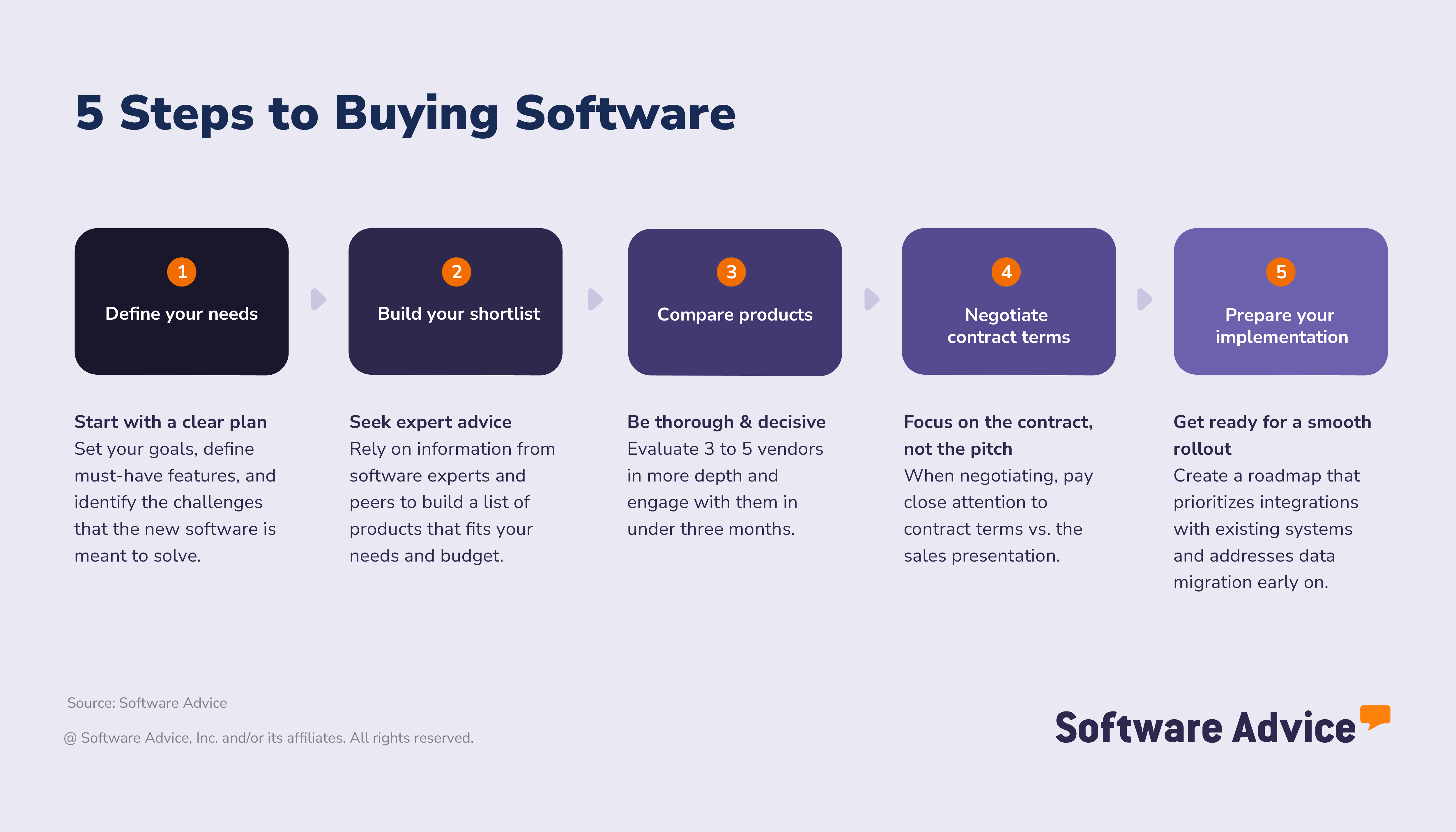
Step 1: Pinpoint your manufacturing priorities
The journey to the right MES begins with a deep dive into your plant’s unique needs, not just generic software wish lists. MES is purpose-built for the shop floor, so your selection process should focus on operational realities, production targets, and the specific pain points that impact your bottom line.
Clarify your production challenges
MES is designed to bridge the gap between planning and execution. Start by mapping out your biggest obstacles:
Are you losing valuable time to manual data entry?
Struggling to trace materials across multiple workstations?
Facing bottlenecks that slow down throughput or make quality control a headache?
These are the issues MES can directly address.
Think about how your current processes limit visibility or responsiveness. For example, if you can’t quickly identify the root cause of production defects, or if real-time performance data is missing, MES can help you close those gaps.
“MES, or manufacturing execution system, is basically tracking their work in progress—like the actual production floor where a job is. Kind of where it is in the process, and that is also used to track any kind of bottlenecks or constraints. They can see, hey, this spent two hours at station #2 and it should be an hour and 30 minutes and kind of optimize that process.” — Cameron Pugh, senior manufacturing software advisor
Define success in manufacturing terms
Once you’ve identified your operational hurdles, translate them into clear, measurable goals. MES excels at tracking and improving metrics that matter to manufacturers:
Real-time visibility into work-in-progress
Faster response to equipment failures
Automated quality checks and traceability
Reduced unplanned downtime
More accurate production scheduling
Set targets that reflect your priorities, such as reducing changeover times by 20%, cutting scrap rates in half, or achieving full electronic batch records compliance. These goals will guide your MES search and help you evaluate solutions objectively.
Consider your shop floor’s future
MES investments should be forward-looking. Will you expand to new lines or plants? Are you planning to adopt lean manufacturing or Industry 4.0 technologies? Make sure your MES can scale, support new integrations (like IoT sensors or advanced analytics), and adapt to evolving regulatory demands.
Common triggers for MES upgrades include:
Launching new product lines or custom manufacturing
Needing tighter integration with ERP or supply chain systems
Preparing for stricter compliance audits
Moving toward paperless operations
Focus your feature list
MES platforms offer a wide range of capabilities: from real-time dashboards to automated work order routing. Prioritize features that directly support your goals. For example, if traceability is critical, look for robust genealogy tracking and electronic recordkeeping. If downtime is your biggest issue, prioritize predictive maintenance and machine connectivity.
Production priority | MES features to consider |
Real-time visibility | Shop floor dashboards, live data feeds |
Quality and compliance | Automated inspections, traceability logs |
Throughput and efficiency | Scheduling optimization, workflow automation |
Equipment reliability | Maintenance tracking, machine integration |
“Sometimes buyers tell me they want everything under the sun—accounting, HR, supply chain—all in one. One thing I like to recommend is integration. I give them an analogy: Sometimes people have multiple different cars. They've got a minivan for all the kids and they've got a sports car for the weekend and then a truck if they're hauling lumber. That way you're getting the best of each system. A huge manufacturing suite might not have the greatest HR functionality, but a vendor that focuses on HR is gonna be really good at HR. And if they do integrate, it's basically like they're in the same system.” — Cameron Pugh
Build your selection team
MES impacts every corner of the plant, so involve stakeholders who understand both the technical and operational sides. Include production supervisors, line operators, IT specialists, quality managers, and anyone with firsthand experience of your manufacturing challenges.
Step 2: Build your MES shortlist and engage stakeholders
The quality of information you rely on during your MES search can make or break your investment. With so many vendors and features to consider, it’s crucial to filter out marketing hype and focus on insights that reflect real-world manufacturing scenarios.
Disappointed buyers often lean heavily on generic online forums or automated tools for advice. In contrast, successful buyers prioritize structured guidance from industry experts and user review platforms, supplementing their research with practical feedback from peers and trusted advisors. [3]
Get real advice from real people
Our MES advisors are a valuable resource for manufacturers who want guidance grounded in actual plant implementations, not just vendor brochures. They help you:
Match MES features to your production goals, workflows, and facility size
Compare vendors on practical factors like cost, support, and integration capabilities
Plan for a smooth rollout and anticipate common implementation challenges
Speaking with an advisor can clarify your shortlist, answer tough questions, and reduce the risk of costly mistakes. Need help choosing the right MES for your operation? Connect with an advisor for tailored, one-on-one support.
How to leverage user reviews for MES
User reviews are one of the most powerful tools for software buyers. Nearly a third of global software buyers say real user feedback is the most influential part of their decision-making process. [3] For manufacturers, reviews can reveal how an MES performs in actual production environments, offering insights that vendor materials often overlook.
Here’s how to make user reviews work for you:
Seek out feedback from manufacturers with similar operations, whether you run discrete, process, or mixed-mode production, reviews from peers in your industry and facility size are most relevant.
Look for specifics on MES workflows: onboarding, production tracking, quality management, and how the software integrates with machines and ERP systems.
Prioritize recent reviews: MES platforms evolve quickly, so focus on feedback from the past 6–12 months for the most accurate picture.
Balance star ratings with detailed commentary: A thorough review, even with a lower rating, can highlight critical issues or advantages.
Identify recurring themes: Multiple reviewers mentioning integration challenges, reporting limitations, or customer support issues should prompt further questions for vendors.
Expert tip for SMBs:
“By focusing on user reviews that reflect your specific manufacturing environment, you’ll gain a clearer sense of which MES solutions can truly support your production goals, and which ones may fall short.” — Sabrina Khoulalène, Content Analyst for manufacturing at Software Advice
MES pricing: What should you expect?
MES pricing varies widely based on your plant’s needs, complexity, and integration requirements.
Several factors influence MES pricing:
Number of users and production sites: More users and multi-site deployments increase license costs.
Feature set and compliance requirements: Advanced modules for traceability, quality, or regulatory compliance often come at a premium.
Integration needs: Connecting MES to ERP, supply chain, or machine data may incur additional fees for custom integrations or API access.
Support and training: Comprehensive onboarding and ongoing support may be included or billed separately.
Deployment model: Cloud-based (SaaS) MES solutions typically have subscription fees, while on-premise systems may require upfront licensing plus maintenance.
Always request detailed pricing breakdowns from vendors, including setup, customization, and upgrade fees, to avoid surprises and accurately estimate your total cost of ownership.
Comparing MES pricing model
MES vendors offer several pricing approaches, understanding these will help you choose the best fit for your plant:
Subscription (cloud/SaaS): Pay a monthly or annual fee for access, updates, and basic support. Pricing is often based on users, modules, or production sites. This model offers predictable costs and flexibility for growing operations.
Perpetual license (on-premise): Pay a one-time fee to own the license and host MES on your servers. This can be cost-effective for larger plants but may require ongoing maintenance and upgrade costs.
Usage-based pricing: Some MES solutions charge based on production runs, data processed, or machine connections—ideal for plants with variable production volumes.
Modular pricing: Purchase only the MES modules you need (e.g., scheduling, traceability, maintenance), tailoring costs to your requirements and avoiding unnecessary expenses.
When comparing pricing models, consider your plant size, growth plans, and IT infrastructure. The right model ensures you get the features and flexibility you need at a cost that aligns with your budget.
Expert tip for SMBs:
“Remember that what you see on a vendor’s pricing page does not necessarily match what your total cost of ownership will be. Hidden fees for onboarding, support, and additional user seats are par for the course. So is the time you’ll spend transitioning to the new tool, which could result in downtime and costly errors if you don’t properly plan for implementation.” — Sabrina Khoulalène, Content Analyst for manufacturing at Software Advice
Step 3: Compare MES solutions and move forward with confidence
With your shortlist in hand, it’s time to dive deeper and evaluate how each MES option stacks up against your operational needs. This stage is all about hands-on comparison, engaging with vendors through demos and trials, and making sure you’re set up for a decisive, informed decision.
Successful software buyers keep their process streamlined: 61% narrow their shortlist to three or fewer vendors when 68% finalize their purchase within three months of starting their search.
Keeping your shortlist focused and your timeline tight helps maintain momentum and avoids analysis paralysis.
What to watch for as you compare MES vendors
As you evaluate your MES options, pay close attention to these critical factors:
Vendor support and implementation help: MES impacts core shop floor operations, so choose vendors who offer robust onboarding, data migration, and integration assistance.
Compliance and industry fit: If you operate in regulated sectors (like pharmaceuticals, food, or aerospace), verify that MES solutions support necessary compliance standards and documentation.
Manufacturing process alignment: Ensure the MES is designed for your production type, whether discrete, process, batch, or hybrid manufacturing.
Total setup costs: Beyond subscription fees, factor in expenses for customizations, hardware integration, training, and ongoing support.
Usability and training: Assess how intuitive the MES is for operators and supervisors. Consider how much training will be needed to get your team up to speed.
How to maximize MES demos
Product demos are your chance to see how MES solutions perform in real-world scenarios. Bring your key stakeholders—production leads, IT, quality managers—to these sessions for well-rounded feedback.
Request tailored demos: Ask vendors to demonstrate how their MES handles your specific workflows, such as real-time production tracking, quality checks, or downtime alerts.
Test mobile access: If your team relies on tablets or smartphones for tasks like barcode scanning or logging production data, make sure the MES’s mobile features are reliable and user-friendly.
Key questions to ask during MES demos
Use your demo time to dig into the details and clarify how the MES will support your plant’s daily operations and long-term goals:
How does your MES handle real-time shop floor visibility and alerts?
What onboarding and training support do you provide?
What is the typical implementation timeline for a facility like ours?
How do you manage data security, backups, and compliance documentation?
Can your MES integrate with our existing ERP, quality, or supply chain systems?
What are the ongoing support options and response times?
Use our MES comparison scorecard
Stay organized and objective by using a structured comparison scorecard. This tool lets you evaluate MES vendors side-by-side, tracking scores for features, support, integration, and costs. With clear notes and auto-calculated totals, you’ll quickly identify which MES best fits your requirements.
Expert tip for SMBs:
“Consider scheduling two demos per vendor: one focused on your everyday production workflows, and another dedicated to technical topics like integration and data security. This approach helps you cover all bases and makes the most of your team’s time.” — Sabrina Khoulalène, Content Analyst for manufacturing at Software Advice
Step 4: Negotiate your MES contract and pricing
Once you’ve selected your preferred MES solution, it’s time to negotiate a contract that protects your interests and aligns with your plant’s requirements. MES contracts can be complex, so don’t hesitate to ask for clarity, customizations, or better terms. Most vendors expect negotiation and have flexibility around pricing, bundling, and service levels.
Key MES contract terms to know
Understanding the language of MES contracts will help you avoid surprises and ensure you’re getting the value you expect. Here are some terms to review carefully:
Master services agreement (MSA): The main contract outlining responsibilities, deliverables, payment terms, and dispute resolution between you and the MES provider.
Service level agreement (SLA): Defines measurable service standards—such as system uptime, support response times, and compensation for downtime. Make sure SLAs reflect the needs of your production schedule.
Implementation scope and change orders: Clearly define what’s included in your implementation, timelines, deliverables, and how changes will be managed. Unclear scopes can lead to delays and unexpected costs.
License scope and deployment rights: Specifies where and how you can use the MES—across multiple plants, test environments, or specific lines.
User and device licensing: MES may be licensed by named user, concurrent user, or by connected devices (like PLCs, HMIs, or barcode scanners). Choose the model that fits your shift patterns and equipment.
Data ownership and portability: Ensure your plant retains ownership of all production and quality data, with clear terms for exporting data if you switch vendors.
Integration and API access: If you need to connect MES to ERP, SCADA, or other systems, confirm integration capabilities and any associated costs.
Tips for negotiating your MES agreement
Approach MES contract negotiation as a collaborative process. Here’s how to secure the best terms for your operation:
Get a full cost breakdown: Request a detailed quote that covers subscription or license fees, implementation, training, support, integrations, and any add-on modules. Watch for recurring or hidden charges.
Negotiate pricing and bundling: Ask about discounts for multi-year agreements, bundled modules, or volume licensing. Vendors are often willing to match competitor pricing or offer incentives to win your business.
Clarify support and escalation: Ensure your contract spells out support hours, escalation paths for urgent issues, and any included on-site assistance. Reliable support is critical for MES, especially during go-live.
Address compliance and security: If you operate in a regulated industry, make sure the contract covers all necessary compliance, audit, and data security requirements.
Customize your package: Don’t pay for features you won’t use. Negotiate to remove unnecessary modules and focus on the capabilities that will deliver the most value to your team.
Plan for growth: If you expect to expand, discuss terms for adding users, lines, or plants in the future.
MES contract negotiation checklist
Review all contract documents and clarify any vague terms
Confirm all pricing, fees, and renewal/cancellation terms
Ensure data ownership and export rights are clearly stated
Validate support commitments and SLAs
Document all customizations and agreed-upon deliverables
Expert tip for SMBs:
“If some of the language in your contract is vague, get clarification from your vendor until it’s crystal-clear. Don’t close an agreement without understanding every aspect of your contract and addressing every operational, compliance, and workflow requirement.” — Sabrina Khoulalène, Content Analyst for manufacturing at Software Advice
Step 5: Prepare for MES implementation
Selecting your MES is a major milestone, but the real transformation happens during implementation. For manufacturers, rolling out MES impacts every layer of production—from data migration to operator training. A well-planned implementation helps you avoid downtime, streamline adoption, and maximize your investment’s value. Here’s how to set your plant up for a smooth MES launch.
Onboarding
Project leads: Designate a primary point of contact on both your team and the MES vendor’s side. This ensures clear communication and quick resolution of issues.
Implementation timeline: Establish concrete milestones for each phase—initial configuration, pilot testing, and full deployment—so everyone knows what to expect and when.
Cross-functional participation: Identify which departments (production, quality, IT, maintenance, etc.) need to be involved at each stage, from initial setup to go-live.
Integration and data migration
Data selection: Decide which production records, quality logs, inventory data, and machine histories need to be migrated into the new MES.
System connections: List all required integrations—such as ERP, SCADA, or quality management systems—and confirm technical requirements with your vendor.
Vendor involvement: Clarify what support the MES provider offers for data migration, integration setup, and troubleshooting during the transition.
Testing and validation
Workflow testing: Assign team members to validate production workflows, user roles, and alert systems in a test environment before going live.
Performance review: Evaluate whether the MES configuration supports your current processes and enables your operational goals.
Documentation and training
Process documentation: Appoint someone to document MES procedures, user permissions, and step-by-step guides for common tasks.
User training: Schedule hands-on training sessions for all end users—operators, supervisors, and managers—and plan for refresher sessions as needed.
Ongoing support: Ensure there’s a plan for continued support and troubleshooting after launch, including how to escalate issues to your vendor.
Expert tip for SMBs:
“Schedule regular check-ins to gauge progress during an implementation. Post-launch reviews are your time to gather feedback, address issues, and unlock long-term value from your new software.” — Sabrina Khoulalène, Content Analyst for manufacturing at Software Advice
What are the features of MES?
Manufacturing Execution Systems (MES) are purpose-built to bridge the gap between enterprise planning and shop floor execution. MES empowers manufacturers to gain real-time visibility, control, and optimization over every stage of production—whether you’re assembling electronics, producing pharmaceuticals, or fabricating metal parts. The right MES helps you coordinate people, machines, and materials for maximum efficiency and quality.
Core MES features
Based on conversations with hundreds of MES users and industry experts, we’ve identified the foundational features that are most critical for manufacturers seeking to streamline operations and drive continuous improvement: [2]
Production scheduling: MES provides robust tools to plan, sequence, and allocate production resources, ensuring the right jobs are run at the right time. Dynamic scheduling helps minimize downtime, balance workloads, and quickly adapt to changing priorities on the shop floor.
Bills of material (BOM) management: A core MES feature, BOM management allows you to maintain a detailed, up-to-date list of all materials, components, and assemblies required for each product. Accurate BOMs support precise production planning, cost tracking, and regulatory compliance.
Quality management: MES collects quality data at every stage of production, enabling manufacturers to detect defects early, identify process bottlenecks, and ensure compliance with industry standards. Integrated quality management helps minimize scrap, rework, and costly recalls.
Common MES features
When evaluating MES solutions, look for these widely adopted capabilities:
Built-in accounting: MES platforms often include basic accounting tools, allowing manufacturers to manage expenses, invoices, and financial records without needing third-party integrations.
Cost tracking: Track, record, and analyze expenses across projects or production runs. This feature enables better budgeting, cost control, and profitability analysis.
Data collection: MES automates the gathering and measurement of production data—from machines, sensors, and operators—ensuring accurate and timely insights for decision-making.
Document management: Store, manage, and track electronic documents (such as work instructions, quality certificates, and maintenance logs) in a centralized, secure location.
Forecasting: Use historical and real-time data to predict demand, inventory needs, and production schedules, helping manufacturers plan proactively.
Inventory management: Maintain optimal inventory levels by tracking raw materials, work-in-progress, and finished goods, reducing shortages and excess stock.
Order management: Manage and track customer orders, production jobs, and purchase requests to ensure timely fulfillment and visibility.
Product information management: Import, update, and manage product data, including descriptions, specifications, and compliance documents.
Resource allocation: Assign available resources—such as labor, machines, and materials—to projects and tasks, optimizing utilization and minimizing idle time.
Shop floor management: Oversee and control daily operations on the factory floor, from scheduling to workflow adjustments.
Supply chain management: Plan and execute supply chain activities, ensuring materials and products flow efficiently from suppliers to customers.
These common features help manufacturers maintain control, improve collaboration, and drive efficiency throughout the production process.
Advanced MES capabilities manufacturers should consider
As manufacturing operations become more complex and competitive, advanced MES capabilities can unlock greater value and support strategic growth. These features go beyond standard functionality, offering deeper integration, analytics, and automation.
Manufacturers looking to future-proof their operations should consider MES solutions with these advanced features:
Integration with IoT and machine data: Connect MES directly to smart machines, sensors, and PLCs for real-time data exchange, predictive maintenance, and automated alerts.
Advanced analytics and AI: Leverage built-in analytics, machine learning, and artificial intelligence to identify trends, optimize processes, and support data-driven decision-making.
Automated workflow management: Configure rule-based workflows that adapt to changing conditions, trigger alerts, and automate repetitive tasks.
Electronic batch records and compliance tools: Streamline regulatory reporting with automated batch records, audit trails, and compliance documentation—especially important for sectors like pharmaceuticals and food production.
Mobile access and remote monitoring: Enable operators and managers to view dashboards, enter data, and respond to issues from anywhere, using tablets or smartphones.
Customizable dashboards and KPIs: Tailor dashboards to monitor key performance indicators (KPIs) relevant to your plant, providing instant visibility into production, quality, and efficiency metrics.
Advanced scheduling and optimization: Use algorithms to optimize production sequencing, minimize changeovers, and maximize throughput based on real-time constraints.
Supplier and customer portal integration: Facilitate seamless communication and data sharing with suppliers and customers, improving collaboration and visibility across the supply chain.
Energy and sustainability tracking: Monitor energy usage, emissions, and sustainability metrics to support green manufacturing initiatives.
Related MES and Manufacturing Software
MES is often deployed alongside other specialized manufacturing software to create a seamless digital thread across the production lifecycle. When selecting MES, consider how it will integrate with related systems to maximize efficiency and data visibility.
Material requirements planning (MRP): Ensures accurate material requirements and inventory planning for production.
Supply chain management (SCM): Coordinates supplier relationships, logistics, and inventory flow.
Inventory management: Tracks and manages raw materials, work-in-progress, and finished goods.
Enterprise resource planning (ERP): Integrates business processes, including finance, HR, and procurement, with production operations.
Computer aided design (CAD): Supports product design and engineering workflows.
Quality management software (QMS): Enables compliance, inspection, and corrective action tracking.
Environmental health and safety (EHS): Manages workplace safety and regulatory compliance.
Product lifecycle management (PLM): Oversees product development, revisions, and end-of-life management.
MES works best when connected to these systems, creating a unified platform for production, quality, and supply chain management.
Who uses MES?
MES is used by manufacturers of all sizes and production types to gain real-time visibility, improve quality, and optimize shop floor operations. Typical MES users include operators, supervisors, production managers, engineers, and quality teams.
Our advisors regularly support buyers from a broad range of manufacturing sectors, including:
Metal fabrication
Industrial machinery, equipment, and supplies
Food and beverage
Consumer goods
Medical equipment
Building and garden materials
Aerospace
Job shops
Electronics
MES adapts to the specific needs of each industry, supporting everything from batch production and discrete assembly to highly regulated environments.
About our contributors
Author
Sabrina Khoulalène is a Content Analyst at Software Advice, specializing in manufacturing and inventory management solutions. Her research empowers business leaders to make informed software choices that streamline production and optimize operations. Sabrina’s insights draw from thousands of real-world user reviews and extensive conversations with manufacturers and software buyers. She frequently surveys industry professionals to capture evolving trends and challenges, ensuring her guidance reflects the latest market dynamics. Sabrina is dedicated to helping small and midsize manufacturers find the right tools to drive efficiency, growth, and long-term success.
Editor
Parul Sharma is a content editor at Software Advice with expertise in curating content for various niches, including SaaS, digital marketing, and search engine optimization. With over half a decade of experience in content writing and editing, Parul has the expertise to simplify complex terms into engaging, valuable content for targeted audiences. She completed her graduation and post-graduation in English literature from Delhi University and was awarded the Dr. Asha Sahni Memorial Award for being the highest scorer in her graduating class. Parul has contributed to the news, lifestyle, education, and health verticle of DNA India, India’s premier media channel. Outside of work, she can be found curating healthy recipes, coloring in mandala books, and spending quality time with her family.
Advisors
Cameron Pugh is a senior advisor. He joined Software Advice in 2022, and he is based in Austin, TX. Cameron works directly with small business leaders to connect them with best fit software providers. He assesses the technology needs of small businesses seeking tools such as CMMS, inventory management, call center, and facilities software through one-to-one conversations and provides a short list of potential matches. His favorite part of being a software advisor is experiencing the buyer’s gratitude and relief when he finds the best software solution for their needs.
Source
Software Advice reviews data: Reviews are collected from verified users for individual software products.
Software Advice advisor call notes: Findings are based on data from telephonic conversations that Software Advice’s advisor team had with small to mid-sized businesses seeking manufacturing softwareCMMS tools.
Software Advice 2026 Software Buying Trends survey was conducted online in August 2025 among 3,385 respondents in Australia (n=281), Brazil (n=278), Canada (n=293), France (n=283), Germany (n=279), India (n=260), Italy (n=263), Mexico (n=288), Spain (n=273), the U.K. (n=299), and the U.S. (n=588), at businesses across multiple industries (including 389 respondents in manufacturing roles), ages (1 year in business or longer), and sizes (5 or more employees). Business sizes represented in the survey include: 1,676 small (5-249 full-time employees), 822 midsize (250-999), and 887 enterprise (1,000+). The goal of this study was to understand the timelines, organizational challenges, research behaviors, and adoption processes of business software buyers. Respondents were screened to ensure their involvement in business software purchasing decisions.
Your Guide to Top Manufacturing Execution Software, April 2025


Manufacturing Execution FAQs
- What is the difference between MES and ERP?
MES manages and optimizes real-time production on the shop floor—tracking work-in-progress, equipment status, and quality. ERP handles higher-level business processes like finance, procurement, and resource planning. Used together, ERP plans and allocates, while MES executes and monitors production.
- How does MES differ from SCADA?
SCADA monitors and controls equipment, collecting real-time sensor data and issuing alerts for machinery. MES uses that data for scheduling, resource management, and quality control—turning raw machine information into actionable production insights. In short: SCADA controls, MES manages.
- What’s the relationship between MES and PLC?
PLCs (programmable logic controllers) automate machine operations—starting, stopping, or adjusting equipment based on sensor input. MES sends instructions to PLCs, gathers data from them, and uses that information to oversee production, track progress, and maintain quality.
- What does a manufacturing execution system actually do?
MES digitizes and coordinates production—embedding quality checks, tracking materials, collecting machine data, and analyzing performance. It helps manufacturers reduce downtime, spot bottlenecks, ensure compliance, and boost productivity.
- Who uses MES?
MES is used by manufacturers of all sizes—across industries like automotive, aerospace, food and beverage, pharmaceuticals, electronics, and consumer goods. Typical users include operators, supervisors, engineers, and plant managers who need real-time visibility and control.
- How does MES improve quality and compliance?
MES enforces quality checks at every stage, logs inspection data, and maintains traceability for audits. This is crucial for regulated industries (e.g., medical devices, food), where compliance and recall readiness are essential.
- Can MES integrate with other software?
Yes. MES often connects with ERP, SCADA, quality management, and supply chain systems—creating a unified platform for end-to-end production management.
- What are the main benefits of MES?
Real-time production visibility, Reduced errors and rework, Automated compliance and traceability, Improved scheduling and resource use, Faster, data-driven decisions.
- Is MES suitable for small manufacturers?
Absolutely. MES solutions scale to fit small job shops as well as large, multi-site operations. Many vendors offer modular or cloud-based MES for easier adoption and lower upfront costs.