


Best Financial Reporting Software of 2026
Updated January 14, 2026 at 5:45 AM

Written by Amita Jain
Senior Content Writer

Edited by Parul Sharma
Editor

Reviewed by Cameron Pugh
Senior Advisor

Talk with us for a free 15-min consultation
Expert advisors like Jacqueline, who have helped 1,000+ companies, can find the right software for your needs.
- All Software
- Software Advice FrontRunners
- Popular Comparisons
- Buyer's Guide
- Frequently Asked Questions
Financial reporting software helps finance teams and business managers track, analyze, and present data for audits, budgeting, and compliance. With 400 products built for different workflows and regulations, the market can be overwhelming. To help you narrow it down, I worked with our financial reporting software advisors to curate a list of recommended productsi and a list of the financial reporting software FrontRunners based on user reviews. For further information, read my financial reporting software buyer's guide.
Financial Reporting Software
Sort by
Reviews: Sorts listings by the number of user reviews we have published, greatest to least.
Average Rating: Sorts listings by overall star rating based on user reviews, highest to lowest.
Alphabetically (A-Z): Sorts listings by product name from A to Z.

Sage Intacct operates within the Sage Business Cloud portfolio as a comprehensive cloud-based financial management software, exp...Read more about Sage Intacct


Sage Intacct's Best Rated Features
See All
Sage Intacct's Worst Rated Features
See All

Vena is a financial planning and analysis (FP&A) platform. It is designed to work with Microsoft 365 apps, cloud technology, and...Read more about Vena


Vena's Best Rated Features
See All
Vena's Worst Rated Features
See All

Sage 50 Accounting is an accounting solution designed to cater to the needs of small and medium-sized businesses. It offers a su...Read more about Sage 50 Accounting

Sage 50 Accounting's Best Rated Features
See All
Sage 50 Accounting's Worst Rated Features
See All

Xledger is a cloud-based enterprise resource planning (ERP) solution that caters to midsize and large businesses and helps them ...Read more about Xledger


NetSuite is an AI-powered cloud-based business management suite that incorporates ERP, financial management, CRM and eCommerce f...Read more about NetSuite


NetSuite's Best Rated Features
See All
NetSuite's Worst Rated Features
See All
Software Advice FrontRunners 2026

(8328)

(3250)

(1710)

(20593)

(4502)

(1791)

(2534)

(671)

(105)

(140)
Best for Quick Implementation


- Key FeaturesQuickBooks Online's scoreCategory average
Accounting
4.514.57 category average
Income & Balance Sheet
4.504.59 category average
Reporting/Analytics
4.464.53 category average
- Screenshots


Highly Rated for Automation

Xero

- Key FeaturesXero's scoreCategory average
Accounting
4.594.57 category average
Income & Balance Sheet
4.564.59 category average
Reporting/Analytics
4.484.53 category average
- Screenshots


Best for User Interface

Wave

- Key FeaturesWave's scoreCategory average
Accounting
4.494.57 category average
Income & Balance Sheet
4.484.59 category average
Reporting/Analytics
4.864.53 category average
- Screenshots


Highly Rated for Customization


- Key FeaturesQuickBooks Enterprise's scoreCategory average
Accounting
4.554.57 category average
Income & Balance Sheet
4.604.59 category average
Reporting/Analytics
4.474.53 category average
- Screenshots


Best for Mobile app

FreshBooks

- Key FeaturesFreshBooks's scoreCategory average
Accounting
4.524.57 category average
Income & Balance Sheet
4.414.59 category average
Reporting/Analytics
4.604.53 category average
- Screenshots


Highly Rated for Integrations
NetSuite

- Key FeaturesNetSuite's scoreCategory average
Accounting
4.414.57 category average
Income & Balance Sheet
4.354.59 category average
Reporting/Analytics
4.124.53 category average
- Screenshots


Highly Rated for Quick Adoption/Easy Adoption


- Key FeaturesQuickBooks Desktop's scoreCategory average
Accounting
5.04.57 category average
Income & Balance Sheet
4.624.59 category average
- Screenshots


Most Rated for SMBs

Zoho Books

- Key FeaturesZoho Books's scoreCategory average
Accounting
4.464.57 category average
Income & Balance Sheet
4.564.59 category average
Reporting/Analytics
4.644.53 category average
- Screenshots


Most Used By Wholesale

Datarails

- Key FeaturesDatarails's scoreCategory average
Income & Balance Sheet
4.604.59 category average
Reporting/Analytics
4.594.53 category average
- Screenshots


LiveFlow

- Key FeaturesLiveFlow's scoreCategory average
Accounting
5.04.57 category average
Income & Balance Sheet
4.794.59 category average
Reporting/Analytics
4.834.53 category average
- Screenshots


Sage Intacct

- Key FeaturesSage Intacct's scoreCategory average
Accounting
4.664.57 category average
Income & Balance Sheet
4.394.59 category average
Reporting/Analytics
4.574.53 category average
- Screenshots


FreeAgent

- Key FeaturesFreeAgent's scoreCategory average
Accounting
4.504.57 category average
Income & Balance Sheet
4.784.59 category average
- Screenshots


- Key FeaturesQuickBooks Online Advanced's scoreCategory average
Accounting
4.574.57 category average
Income & Balance Sheet
4.644.59 category average
Reporting/Analytics
4.564.53 category average
- Screenshots


- Key FeaturesSpreadsheet Server's scoreCategory average
Accounting
5.04.57 category average
Income & Balance Sheet
4.864.59 category average
Reporting/Analytics
4.794.53 category average
- Screenshots


- Key FeaturesDynamics 365 Business Central's scoreCategory average
Accounting
4.364.57 category average
Income & Balance Sheet
4.204.59 category average
Reporting/Analytics
4.294.53 category average
- Screenshots


Domo

- Key FeaturesDomo's scoreCategory average
Income & Balance Sheet
4.504.59 category average
Reporting/Analytics
4.484.53 category average
- Screenshots


Planful

- Key FeaturesPlanful's scoreCategory average
Accounting
4.114.57 category average
Income & Balance Sheet
4.484.59 category average
Reporting/Analytics
4.244.53 category average
- Screenshots


Vena

- Key FeaturesVena's scoreCategory average
Income & Balance Sheet
4.554.59 category average
Reporting/Analytics
4.444.53 category average
- Screenshots


- Key FeaturesPatriot Accounting's scoreCategory average
Accounting
4.424.57 category average
Income & Balance Sheet
4.174.59 category average
Reporting/Analytics
4.644.53 category average
- Screenshots


- Key FeaturesSage Accounting's scoreCategory average
Accounting
4.474.57 category average
Income & Balance Sheet
4.424.59 category average
Reporting/Analytics
4.034.53 category average
- Screenshots


- Key FeaturesSyft Analytics's scoreCategory average
Accounting
4.924.57 category average
Income & Balance Sheet
4.784.59 category average
Reporting/Analytics
4.724.53 category average
- Screenshots


- Key FeaturesWorkday Adaptive Planning's scoreCategory average
Accounting
4.384.57 category average
Income & Balance Sheet
4.424.59 category average
Reporting/Analytics
4.404.53 category average
- Screenshots


Budgyt

- Key FeaturesBudgyt's scoreCategory average
Accounting
4.804.57 category average
Income & Balance Sheet
4.704.59 category average
Reporting/Analytics
4.504.53 category average
- Screenshots


- Key FeaturesAccounting Seed's scoreCategory average
Accounting
4.564.57 category average
Income & Balance Sheet
4.424.59 category average
Reporting/Analytics
4.104.53 category average
- Screenshots


Methodology
The research for the best financial reporting software list was conducted in October 2025. We evaluated data (user reviews and demand signals) from the past 24 months as of the research date. Read the complete methodology.
Popular Financial Reporting Comparisons


Buyer's Guide
This detailed guide will help you find and buy the right financial reporting software for you and your business.
Last Updated on May 27, 2025Here's what we'll cover:
What you need to know about financial reporting software
What is financial reporting software?
Essential features of financial reporting software
Benefits and competitive advantages of using financial reporting software
How to choose the best financial reporting software for your business
Software related to financial reporting
More resources for your financial reporting journey
What you need to know about financial reporting software
Financial reporting software is a category of accounting software dedicated to supporting strategic business goals. As opposed to basic bookkeeping systems that record daily transactions, financial reporting software is focused on compiling that data into structured reports and dashboards for analysis and decision-making.
It helps business owners quickly gauge everything from historical performance to adherence to tax laws and regulatory requirements. However, choosing a financial reporting solution can be challenging given the variety of options available. With more than 400 financial reporting products listed on our site, there’s no shortage of vendors and features to consider.
Understanding how much to budget should be a top priority. Pricing for financial reporting tools varies widely based on business size, complexity, and features. Entry-level solutions for small businesses can start at around $20 per month. [1] Mid-market systems with more advanced reporting and integration capabilities typically cost a few hundred dollars per month (depending on the number of users and modules included).
You should also involve your finance team and other stakeholders to figure out answers to critical questions about your financial reporting software purchase, such as:
Which reporting features do we need, and which might be redundant with our current accounting system?
How easily does the software integrate with existing systems and data sources? Can it pull data from our ERP, CRM, or spreadsheets without manual effort?
Can we customize reports to fit our business requirements? (E.g., creating custom fields or KPIs specific to our industry or internal metrics.)
Does the system help automate compliance with accounting standards and regulations? For instance, will it produce GAAP or IFRS-compliant financial statements?
What built-in tools, such as analytics and visualization, does the software offer to communicate findings to stakeholders?
With help from our experienced accounting software advisors, Cameron Pugh, Eric Franco, and Bryan Dengler, this buyer’s guide will equip you with the right information to make a confident software purchase decision.
What is financial reporting software?
Financial reporting software pulls data from accounting systems (and other sources) to generate key financial insights and statements for businesses. It helps companies track profitability and ensure compliance with accounting standards. As our advisor, Dengler, mentions, these systems provide more sophisticated capabilities than basic accounting solutions, helping users track performance metrics, identify trends, and make smart data-driven decisions. “They are designed to address scenarios where businesses say, ‘I don't like the reporting in my accounting program,’” says Dengler.
Common features of financial reporting software include automated report generation, customizable dashboards, financial analysis, and data visualization tools.
Essential features of financial reporting software
Almost all financial reporting software systems offer core features like automatic data import or export, drill-down financial analysis, and customizable reports. Beyond this, the features offered can be almost endless, as vendors will differ in the depth of financial reporting they want their product to focus on.
Based on our analysis of common requests from buyers and themes in user reviews, these are the most important financial reporting features and capabilities to consider. [2]
Core financial reporting software features
Data import or export | Import and export data to and from software applications. 85% of our reviewers rate this feature as critical or highly important. |
Self-service reporting | Allow users to create their reports and financial statements. 63% of our reviewers rate this feature as critical or highly important. |
Financial analysis | Evaluate units, projects, budgets, and other finance-related data to gauge performance and potential risk. 53% of our reviewers rate this feature as critical or highly important. |
Common financial reporting software features
Reporting or analytics | View and track pertinent metrics to find patterns and gain insights from data. 95% of our reviewers rate this feature as critical or highly important. |
Income and balance sheet | A statement detailing a business's financial position, including assets, liabilities, and equity, at a certain point in time. 93% of our reviewers rate this feature as critical or highly important. |
Profit or loss statement | A type of financial statement used to record and report an organization's revenues, costs, and expenses over a specific period of time. 93% of our reviewers rate this feature as critical or highly important. |
General ledger | A centralized accounting record that tracks all financial transactions. 86% of our reviewers rate this feature as critical or highly important. |
Billing and invoicing | Create, manage, and send invoices or bills to customers. 82% of our reviewers rate this feature as critical or highly important. |
Budgeting and forecasting | Create budgets based on historical data and future projections. 78% of our reviewers rate this feature as critical or highly important. |
In addition to the standard reports, companies with more complex structures often ask for roll-up reporting, which aggregates data from multiple analytics units and lets you see that data together in one report. Franco highlights that “roll-up reporting” is frequently requested by businesses that manage multiple entities, “like those with five or six different types of revenue streams,” that need consolidated financial views. This is especially valuable to companies that have outgrown basic accounting solutions.
Benefits and competitive advantages of using financial reporting software
Companies that keep a keen eye on their financial health have a distinct advantage in their industry. They are able to spot trends in time that affect profitability, plan for taxes, and ensure they’re meeting regulatory reporting standards.
Every business knows the importance of good financial data, but only those leveraging the right tools reap the full rewards. Dengler, who has been advising software buyers for nearly a decade, says this is one of the key benefits of adopting financial reporting software. “Many businesses adopt financial reporting tools to replace time-consuming manual bookkeeping with automated workflows and bring accuracy and speed in day-to-day financial reports,” Dengler says.
Some benefits that reviewers say financial reporting software brings include:
Geographic and regulatory flexibility: Companies that operate in multiple states can manage different tax jurisdictions and regulatory requirements with advanced reporting tools. This helps simplify compliance and supports smoother expansion into new projects, locations, or markets without losing financial clarity.
Streamlined expense reporting: Features like receipt scanning, data capture, and approval workflow management help automate expense management and reporting, eliminating paperwork and manual data entry and giving owners real-time visibility into where money is going.
Improves accounting and bookkeeping: Financial reporting software ties directly into core accounting ledgers (like general ledger and accounts receivable or payable), reducing duplicate work and errors. This results in more effortless month-end closings and simplified tax compliance, enabling finance teams to focus on analysis rather than data collection.
Unified view of finances: Financial reporting tools allow businesses to consolidate information from multiple units and companies to provide a unified view of finances across organizational structures.
How to choose the best financial reporting software for your business
Step 1. Define your requirements
We surveyed 3,500 software buyers and found that the most common thing regretful software buyers would do to avoid regret on their next purchase is clearly defining their goals and desired outcomes. [3]
Meeting with stakeholders and outlining the specific needs and goals for your financial reporting software is critical at the outset. This ensures everyone is aligned on what kind of software to look for and also gives you a measuring stick to declare whether your purchase is ultimately successful.
Here are some things to keep in mind as you define your requirements.
Understand your industry-specific requirements
Every business has unique financial reporting requirements based on its industry and operations. Identify what reports and features are critical for your field. For example, a construction firm might need project-level cost tracking, while a nonprofit needs fund-specific ledgers. In some cases, specialized regulatory demands come into play, like banking firms must adhere to certain capital adequacy ratios.
Make sure any tool you consider can handle these industry or location-specific needs. Franco notes that companies operating in multiple states often require “something a little bit more granular” in their reporting for tax purposes,” a reminder that if your business spans regions or tax jurisdictions, your reporting tool should be able to support the necessary level of detail.
Plan for future business growth and scalability
Think beyond your current needs and ensure the software will scale with you. A solution that fits a small business today may falter as you expand to new locations, add business units, or increase transaction volume.
Franco, who has been advising business owners on technology needs for several years, has seen growing companies outgrow basic accounting tools. For instance, firms with multiple entities under one umbrella often struggle to “roll up” consolidated reports in their entry-level software.
Choosing a platform that accommodates multi-entity consolidations, multi-currency, and a higher workload from the start will save you from needing another upgrade in a few years.
Budget for your entire financial stack
When budgeting for financial reporting software, look beyond the sticker price. Consider how costs will scale as your business grows: adding users, more data, or advanced features often drive up costs. Based on advisor conversations, 52% of buyers spend under $210 per month on financial reporting software, while 31% invest over $630. This difference reflects the range of available products and varying business needs, from small to large enterprises.
Most small businesses are well-served by purchasing financial reporting software in-suite, as one application included in a larger accounting platform. This helps ensure that financial reporting is fully integrated with other key accounting processes, such as budgeting and forecasting, payroll, and billing and invoicing. Examples of this type of system include Xero and QuickBooks Online.
Midsize and growing businesses that outgrow the reporting capabilities offered by basic accounting solutions might consider supplementing their existing system with a stand-alone financial reporting software. This could help curb the costs of an entire accounting system upgrade while meeting more advanced reporting needs.
But this isn’t the only cost you need to budget for. Don’t ignore hidden costs such as implementation, data migration, training, integrations, and support fees. Our advisors recommend determining all the features you need before locking in a rigid budget. If a cheaper system lacks key functions, you might spend more later on add-ons or lose productivity to manual work. In short, budget with flexibility so you can invest in a solution that will grow with your business and prevent expensive surprises down the road.
Consider regulatory compliance and standards
Financial reporting software must align with the accounting standards and compliance requirements relevant to your business. Public companies and global firms will require IFRS or GAAP-compliant statements out of the box, but even smaller businesses benefit from compliance-ready tools. For instance, many lenders and investors demand GAAP-standard financials for transparency.
Verify that any system on your radar supports Generally Accepted Accounting Principles (GAAP) or International Financial Reporting Standards (IFRS) as needed. Choose a platform that stays up to date with tax law changes and regulatory reporting requirements to avoid compliance gaps. Your software should make it easy to produce accurate, audit-ready reports that meet applicable regulatory standards.
Optimize integration with existing systems
Evaluate how well each software option will integrate with your current tech stack. Your financial reporting tool will pull data from systems like your accounting general ledger, ERP, CRM, payroll, or ecommerce platforms. So, seamless data flow is vital to prevent manual work. In fact, according to our survey, 31% of buyers who ended up with “buyer’s remorse” cited poor compatibility with existing systems as a major issue. [3]
To avoid that, check for pre-built integrations or APIs for your key systems and involve your IT team early to assess fit. As Cameron Pugh, our advisor, puts it, it’s often best to choose a reporting solution that’s “integrated with [your] general ledger, accounts receivable, and accounts payable” rather than a bolt-on solution. Also, consider other connections you might need, say, integration with banking feeds or credit card systems, which can streamline data import. The easier your new reporting software meshes with your existing tools, the more time and errors you’ll save in the long run.
Step 2. Make your financial reporting software shortlist
Once you’ve figured out your requirements, it’s time to research your options and come up with a shortlist of 2-3 systems to evaluate further.
Here are some ways to easily narrow down your financial reporting software options and create a reliable shortlist.
Get qualified help from our advisors
At Software Advice, our advisors, such as Cameron Pugh, Eric Franco, and Bryan Dengler, have experience helping organizations identify financial reporting systems that match their needs and budgets.
If you need help, you can either schedule a phone call with an advisor or chat online with one right now. In just a few minutes, your advisor will help you identify a shortlist of financial reporting software options that best align with your requirements.
Explore our list of talent management FrontRunners
If you’d rather do the research yourself, a good place to start is our financial reporting FrontRunners report. Using reviews data, we map the top products in the category based on customer satisfaction and usability.
Step 3. Pick the best option
Now it’s time to see those shortlisted solutions in action. This means talking to vendors, scheduling demos, and getting some hands-on time through free trial periods.
Here are our tips at this stage.
Be ready with the right questions during demos
To get the most value, come prepared with a list of questions and scenarios to guide the demo; don’t just passively watch a sales presentation. Going in with clear questions will help you cut through the sales pitch and reveal how the software really works. A few key questions to ask during demos:
If I wanted to generate a specific report, how would I do it?
How does this feature work on mobile devices?
What will be needed to integrate the software with my other systems? (Confirm whether the integrations you need are “plug and play” or need to be built from scratch.)
What kind of user training resources and support do you offer?
Do you charge for implementation and data migration?
Also consider asking about the product roadmap (to ensure the vendor is actively improving the software), the frequency of updates, and how data backups or security are handled. You can take multiple demos. By the end of each demo, you should have a clear picture of how well the solution fits your business and what working with a vendor entails (e.g. support responsiveness, implementation process).
Take advantage of our ultimate software vendor comparison chart to keep track of the answers and how your team is scoring different products.
Take advantage of free trials
Whenever possible, get hands-on with the software through a free trial. A live demo is useful, but there’s no substitute for testing the system yourself with real-world tasks. Many vendors offer a trial environment or sandbox. Use it to run a few typical reporting processes (for example, try importing some of your data and generating a report or two).
During the trial, involve the team members who will be daily users of the system and gather their feedback. This will quickly highlight the user experience, learning curve, and any technical hiccups in a way demos might not.
Make a purchase decision in a timely manner
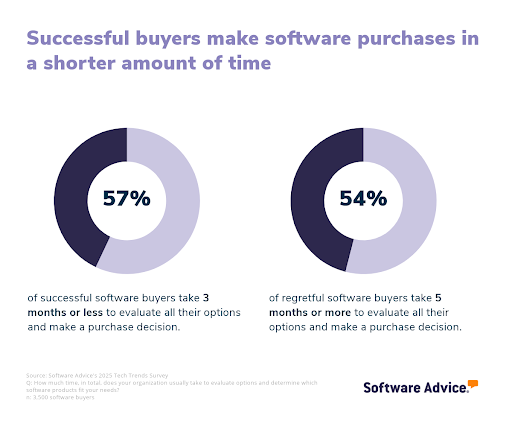
With demos and trials completed, gather your team’s input and make a decision while the insights are fresh. Dragging out the selection process too long can stall your business objectives and lead to “analysis paralysis.” We find that most successful buyers (57%) take three months or less to evaluate software options, while most regretful buyers (54%) take five months or more.
To avoid getting stuck, set a firm timeline or deadline for the final decision and stick to it. If you’ve done your homework in the earlier steps, you should have all the data you need (feature checklists, cost comparisons, user feedback from trials) to choose the best-fit solution.
Step 4. Make the most of your financial reporting software
Here are some best practices to maximize the value of your new financial reporting system:
Develop a detailed implementation plan and assign a champion. Assemble a capable implementation team and designate an internal adoption champion, someone in your organization who will lead the charge, help colleagues learn the system, and liaise with the vendor as needed.
Don’t skimp on training. Arrange comprehensive training sessions for all users and consider diverse formats to suit different learning styles (online tutorials, live workshops, hands-on labs, etc.).
Continuously optimize and educate. To truly reap the benefits of your financial reporting software, plan for a staggered rollout. Start with the most important use case, do tests, gather user feedback, squash bugs, then move on to the next most important use case, and so on. Schedule periodic check-ins (say, after 3 months, 6 months) to gather user feedback to help users leverage the full system’s capabilities.
Our five critical steps to a successful software implementation can help guide you through this process.
Software related to financial reporting
During your search, you may come across other tools that provide complementary features to financial reporting systems. Some of these tools can combine to help you build a tech stack that best addresses your specific needs.
Accounting software: Accounting software helps businesses track income, expenses, and overall financial performance. Most financial reporting software integrates directly with accounting platforms to pull key financial data.
Business intelligence software: Business intelligence (BI) software focuses on data analysis, visualization, and reporting. Integrating BI tools with financial reporting software improves strategic decision-making.
Budgeting software: Budgeting tools help businesses forecast revenue and expenses, compare actual vs. planned performance, and generate financial models. Some financial reporting systems include budgeting features, but standalone budgeting tools offer more sophisticated planning capabilities.
Audit software: Audit management tools assist in tracking internal controls, financial accuracy, and regulatory compliance.
Sales tracking software: These systems monitor and analyze sales performance metrics that directly impact financial reporting, providing visibility into revenue pipelines.
Compliance software: These systems help ensure your financial reporting meets relevant industry regulations and standards, reducing risk and ensuring accuracy.
More resources for your financial reporting journey
6 Accounting Reports To Analyze Your Small-Business Operations
Small Business Guide To Set Up an Effective Accounting Function: 5 Essentials
About our contributors
Author
Amita Jain is a senior writer for Software Advice, covering finance technology with a focus on expense management and accounting solutions for small-to-midsize businesses. After completing her master’s in policy studies from King’s College London, she began her career as a journalist in New Delhi, India, where she garnered first-hand knowledge of the startup space and the education sector. She spent nearly half a decade covering high-level events hosted by the United Nations and the Government of India. Her work has been featured in Careers360, among other publications.
Amita’s research and writing for Software Advice is informed by more than 130,000 authentic user reviews and over 30,000 interactions between Software Advice software advisors and software buyers. Amita also regularly speaks to leaders in the finance and accounting space so she can provide the most up-to-date and helpful information to small and midsize businesses purchasing software or services.
When she’s not contemplating tech solutions for SMBs, Amita finds her zen in swimming, doodling, and indulging in animated sitcoms and science fiction.
Editor
Parul Sharma is a content editor at Software Advice with expertise in curating content for various niches, including SaaS, digital marketing, and search engine optimization. With over half a decade of experience in content writing and editing, Parul has the expertise to simplify complex terms into engaging, valuable content for targeted audiences. She completed her graduation and post-graduation in English literature from Delhi University and was awarded the Dr. Asha Sahni Memorial Award for being the highest scorer in her graduating class.
Parul has contributed to the news, lifestyle, education, and health verticle of DNA India, India’s premier media channel. Outside of work, she can be found curating healthy recipes, coloring in mandala books, and spending quality time with her family.
Contributors
Cameron Pugh is a senior advisor. He joined Software Advice in 2022, and he is based in Austin, TX.
Cameron works directly with small-business leaders to connect them with best fit software providers. He assesses the technology needs of small businesses seeking tools such as CMMS, inventory management, call center, and facilities software through one-to-one conversations and provides a short list of potential matches.
His favorite part of being a software advisor is experiencing the buyer’s gratitude and relief when he finds the best software solution for their needs.
Eric Franco is a senior advisor. He joined Software Advice in 2019, and he is based in Austin, TX.
Eric works directly with small business leaders to connect them with best fit software providers. He assesses the technology needs of small businesses seeking accounting, manufacturing, learning management, and supply chain software through one-to-one conversations and provides a short list of potential matches.
His favorite part of being a software advisor is hearing the sense of relief in a stressed buyer’s voice when they realize he can help them find the right software for their needs.
Bryan Dengler is a senior advisor. He joined Software Advice in 2022, and is based in Austin, TX.
As part of the software advisor team, Bryan helps professionals from a wide range of industries who are seeking accounting, project management, manufacturing, learning management, and supply chain software. He provides a shortlist of personalized technology recommendations based on budget, business goals, and other specific needs.
Bryan’s favorite part of being a software advisor is knowing he’s made a valuable difference in a buyer’s life with each advising session he holds.
Sources
Software Advice software pricing data: Only products with publicly available pricing information and qualified software products within the category, as of the production date, are included in the pricing analysis. Read the complete methodology.
Software Advice reviews data: Software Advice reviews are collected from verified users for individual software products. For this report, we analyzed reviews from the past year as of the production date. Read the complete methodology.
Software Advice’s 2025 Tech Trends Survey was conducted online in August 2024 among 3,500 respondents in the U.S. (n=700), U.K. (n=350), Canada (n=350), Australia (n=350), France (n=350), India (n=350), Germany (n=350), Brazil (n=350), and Japan (n=350), at businesses across multiple industries and company sizes (five or more employees). The survey was designed to understand the timeline, organizational challenges, adoption & budget, vendor research behaviors, ROI expectations, and satisfaction levels for software buyers. Respondents were screened to ensure their involvement in business software purchasing decisions.
Software Advice advisor call notes: Findings are based on data from telephonic conversations that Software Advice’s advisor team had with small-to-midsize businesses seeking HR software. For this report, we analyzed phone interactions from the past year as of the production date. Read the complete methodology.
Financial Reporting FAQs
- What is the best financial reporting software?
According to our analysis of products with high market demand and reviews, Phocas is the best-rated software for functionality from verified reviewers of financial reporting software on Software Advice. Our analysis of user reviews in the past year finds dashboard, visualization, and data import or export as the most frequently top-rated features.
- What is the most used financial software?
According to our analysis of products with high market demand and reviews, Fathom had the highest overall rating from verified reviewers on Software Advice. Our analysis of user reviews in the past year finds that it’s highly rated for ease of use, with an average rating of 4.6 out of 5.
- Which software is best for financial analysis?
According to our analysis of products with high market demand and reviews, QuickBooks Online had the highest overall rating from verified reviewers on Software Advice for financial analytics.
- Which software can you use for financial records?
Businesses typically use accounting software to maintain financial records, serving as the company’s official books. The most suitable software depends on the size and complexity of your operations. But all options serve the same core purpose: recording financial transactions in an organized way, so you can produce accurate ledgers, trial balances, and financial statements. In addition, some businesses (especially very small ones or startups) might start out using spreadsheets for basic financial record-keeping. However, spreadsheets can become error-prone and hard to manage as transactions increase, so it is recommended that they move to dedicated software.
- What are the four types of financial reporting?
The four primary types of financial reporting are income statement, also called profit & loss statement (illustrates profitability over a period), balance sheet (shows the financial position at a point in time), cash flow statement (details cash inflows and outflows), and statement of changes in equity (explains movements in owners’ equity over the period). Virtually all other financial reports or metrics draw from them. They each provide unique insights, profitability, stability, liquidity, and shareholder value changes, which together give a 360-degree view of the company’s financial condition. Our analysis of user feedback shows that 93% of users rate both balance sheet and profit/loss statements as critical or highly important features of financial reporting software.
- What are the 4 pillars of financial reporting?
The four pillars of financial reporting are relevance, reliability, comparability, and understandability. Relevance means the information is useful and helps in decision-making. Reliability ensures that financial data is accurate, unbiased, and can be verified. Comparability allows businesses to track financial trends over time or compare reports with other companies. Understandability means final reports should be clear and easy to interpret, even for those without deep accounting knowledge.